 Zyyo
Zyyo 
⚠️本文发布于 1041 天前,内容可能已过时,请注意甄别信息的准确性。
看到了一位大佬的主题很好看,甚是喜欢,是人家自己开发的,真的很羡慕。
吾柯
我决定自己也开始尝试尝试,边学习和边创作的过程,我前端三剑客基本没啥基础,我也只是个高中生,对这些东西已有的认识,都是我对主题修改中学来的,但还是是慢慢来吧,这可能是个漫长的过程,如果我不放弃的话,甚至要数年,可能我会中途放弃。
我特别喜欢大佬的样式,我向大佬询问了,如果大佬同意,我就继续学习开发,如果不行,那我就会有较大的改动,改的至少认不出来是模仿的。
同一个页面大佬写的代码我都看不懂,而自己写的代码又太弱智了。
昨晚一夜没睡,忙活出来这半个页面。
只有静态页面,什么都没有实现呢。
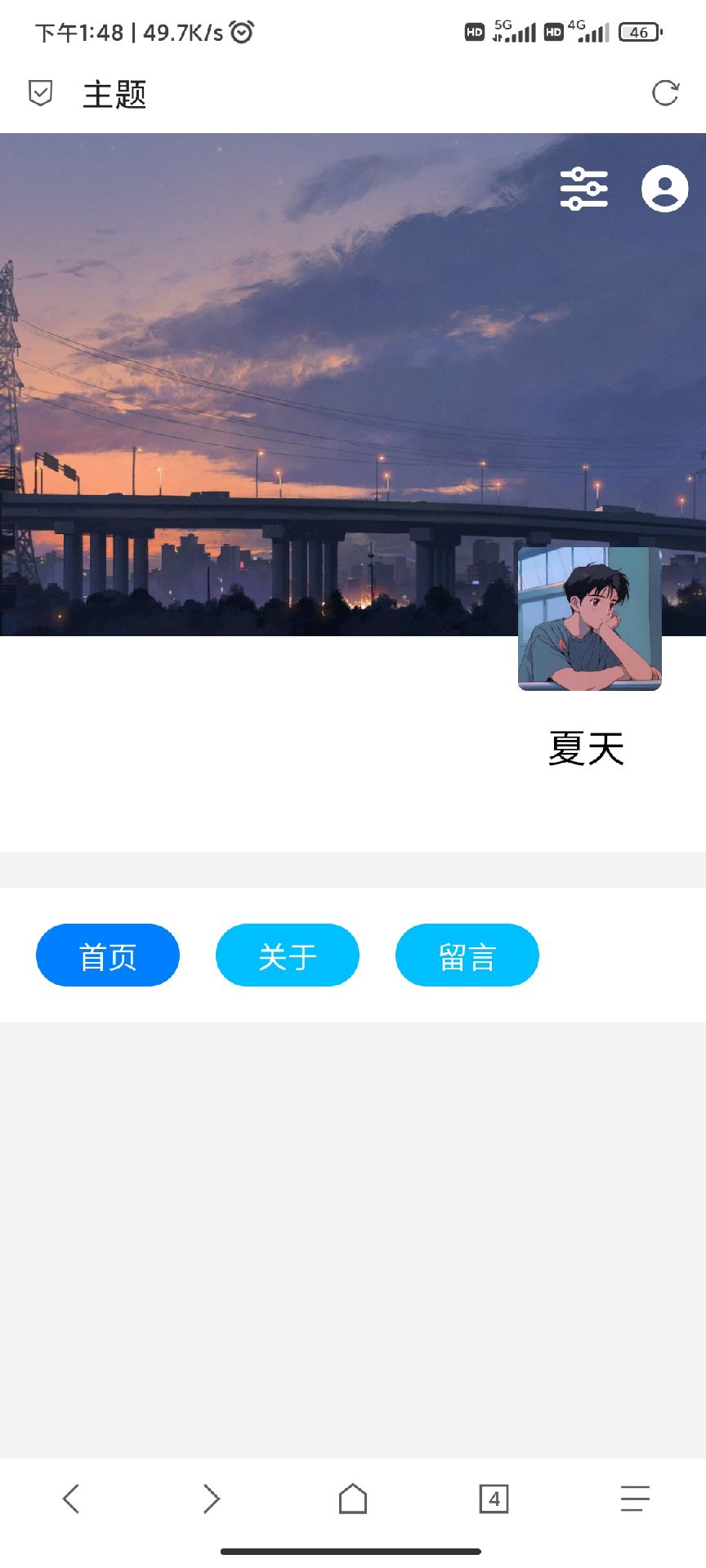
求大家别嘲笑,我的能力就这样,虽然代码写的很弱智,但是是我辛辛苦苦查资料,查百度出来的
<!DOCTYPE html>
<html lang="zh">

<head>
    <meta charset="UTF-8">
    <meta name="viewport" content="width=device-width, initial-scale=1.0">
    <link rel="stylesheet" href="https://cdn.bootcdn.net/ajax/libs/font-awesome/6.4.0/css/all.css">

    <title>主题</title>
    <style>
        body {
            font-family: Arial, sans-serif;
            margin: 0;
            padding: 0;
            background-color: #f2f3f5;
        }

        .app {
            display: flex;
             flex-direction: column;
            overflow: hidden;
            max-width: 500px;
            margin: 10px auto;
        }

        @media (max-width: 767px) {
            .app {
                width: 100vw;
                height: 100vh;
                margin: 0px auto;
            }
        }

        .head {
            display: flex;
            flex-direction: column;
            position: relative;
            height: 400px;
            width: 100%;
        }

        .banner {
            position: relative;
            background-size: cover;
            background-position: center;
            background-image: url(http://p1.qhimg.com/bdm/1024_768_85/t01e66d486b8e826270.jpg);
            height: 280px;
            width: 100%;
        }

        .banner-icon {
            width: 100%;
            height: 50px;
            position: absolute;
            top: 18px;
        }

        .icon1 {
            position: absolute;
            right: 10px;
        }

        .icon2 {
            position: absolute;
            right: 55px;
        }

        .author-bar {
            position: relative;
            background-color: #ffffff;
            height: 120px;
            width: 100%;
        }

        .author-logo {
            width: 80px;
            height: 80px;
            background-size: cover;
            background-position: center;
            background-image: url(https://p.blog.blog.zyyo.net/a.jpg);
            border-radius: 5px;
            position: absolute;
            right: 25px;
            top: -50px;
        }

        .author-text {
            position: absolute;
            top: 45px;
            width: 100%;
        }

        .author-title {
            font-size: 1.3rem;
            font-weight: 600;
            position: absolute;
            right: 45px;
        }

        .author-say {
            font-size: 0.8rem;
            font-weight: 400;
            margin-top: 20px;
        }

        .tab{
            display: flex;
            flex-direction: column;;
            margin-top: 20px;
            position: relative;
            height: 35px;
            width: 100%;
            background-color: #ffffff;
             padding:20px 0px ;
        }

        .tab1 {
            display: flex;
            flex-direction: space-between;
            position: relative;
            height: 100%;
            width:100%;
        }
        .option{
         color:#ffffff;
           display: flex;
            justify-content: center;
            align-items: center;
             border-radius: 18px;
            height: 100%;
            width:80px;
            background-color: #00BFFF;
            margin-left: 20px;
        }
        .option1{
        background-color:#007FFF;
        }
    </style>
</head>

<body>
    <div class="app">
        <div class="head">


            <div class="banner">
                <div class="banner-icon">
                    <div class="icon1"><i style="font-size:25px;color: #ffffff;" class=" fas fa-user-circle"></i></div>
                    <div class="icon2"> <i style="font-size:25px;color: #ffffff;" class="fas fa-sliders-h"></i></i>
                    </div>
                </div>
            </div>


            <div class="author-bar">
                <div class="author-logo"></div>
                <div class="author-text">
                    <div class="author-title">夏天</div>
                    <div class="author-say"></div>
                </div>
            </div>

        </div>
        <div class="tab">
            <div class="tab1">
            <div class="option option1">首页</div>
            <div class="option">关于</div>
            <div class="option">留言</div>
            </div>
        </div>
    </div>
</body>


</html>
开始尝试自己开发主题。
the best adult generator ai gf create erotic videos, images, and virtual characters. flexible settings, high quality, instant results, and easy operation right in your browser. the best features for porn generation.
кино онлайн 2025 смотреть фильмы про тюрьму
фильмы онлайн фильмы с леонардо ди каприо онлайн
онлайн фильм 2025 смотреть фильмы гая ричи онлайн
сервис mail рассылка российские сервисы для рассылки email
the best adult generator ai girlfriend create erotic videos, images, and virtual characters. flexible settings, high quality, instant results, and easy operation right in your browser. the best features for porn generation.
смотреть фильмы онлайн лучшие сериалы 2026 года бесплатно
фильм реклама смотреть онлайн смотреть лучше серия онлайн